


Ajax EN54 Fire Hub - 125733.315
 Ajax
Ajax
- EN54-certified
- Grade 2 Intrusion
- 10.1″ IPS Touchscreen
The Ajax EN54 Fire Hub Jeweller is a touchscreen-based Control & Indicating Equipment (CIE) designed for commercial & municipal fire safety systems. (Read more)
PRODUCT DETAILS
The Ajax EN54 Fire Hub Jeweller is a powerful, touchscreen-based Control and Indicating Equipment (CIE) designed for commercial and municipal fire safety systems. Fully compliant with EN54 standards, this wireless hub brings fire detection, security, automation, and video surveillance into a unified, easy-to-manage platform.
The Fire Hub Jeweller is easy to install, simple to use, and doesn't require much upkeep. Built-in communicators and a fully wireless device connection allow the system to be quickly deployed and connected to monitoring stations through Ajax apps. With its large touch screen and intuitive interface, the CIE provides detailed system status and alarm notifications, ensuring that staff are immediately aware of any situation.
The CIE also supports EN 50131 (Grade 2) intrusion protection, video surveillance, and automation devices, making it a unified solution for commercial and municipal sites. Each alarm can be supported by visual verification, helping guide the facility staff on responding to the emergency.
EN54 Fire Hub Jeweller supports up to 64 automation scenarios, offering the flexibility to tailor safety to each site's specific needs. With the EN54 I/O Module (2X2) Jeweller, the system can control fire protection equipment, such as triggering PAVA & VACIE voice evacuation systems, opening electric locks, switching on LED emergency signage, or blocking elevator access. All automated actions will be executed even if the CIE is offline.
When intrusion devices are connected, automation can go further. The CIE can shut off water during a leak or turn on ventilation if the CO₂ level rises. Users can also automate lighting, roller shutters, and garage doors based on arming/disarming, schedules, button presses, or detector alarms.
Please note: These panels do not come with the back up battery included. They can be found here... 24 hour or 72 hour
Interface
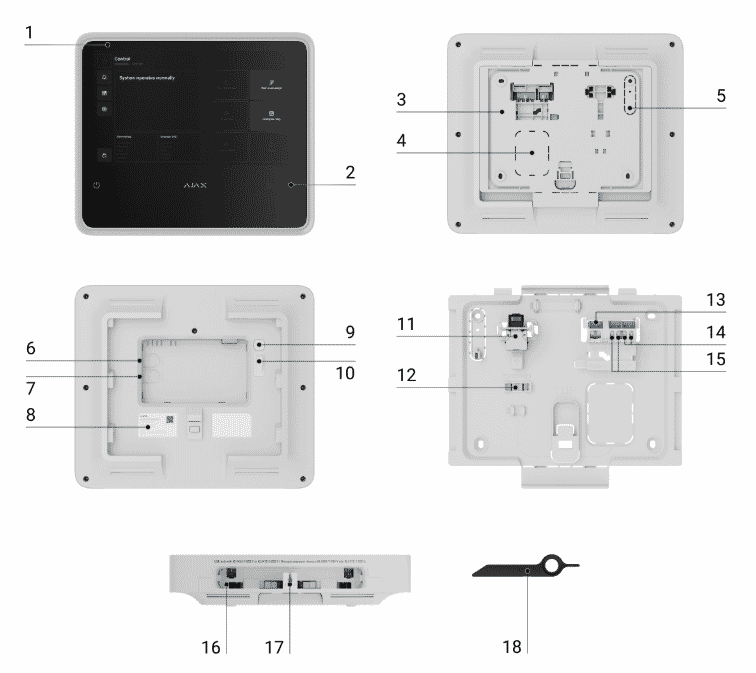
| No | Description |
|---|---|
| 1 | IPS touch display with a 10.1″
diagonal. |
| 2 | Card/key fob reader (coming
soon). |
| 3 | SmartBracket mounting panel. |
| 4 | Perforated part of the mounting panel
for routing cables through the wall. |
| 5 | Perforated part of the mounting panel
that triggers the tamper button if the device is removed from the
surface. Do not break it off. |
| 6 | Slot for micro SIM 2. |
| 7 | Slot for micro SIM 1. |
| 8 | QR code and ID (serial number) of the
device. |
| 9 | Power button. |
| 10 | Tamper button. |
| 11 | Ethernet cable connector. |
| 12 | Bubble level for checking mount
inclination angle during installation. |
| 13 | Terminals for connecting a power
cable. |
| 14 | Relay output 2 — for alerting the
monitoring station to fire alarms. |
| 15 | Relay output 1 — for alerting the
monitoring station to system faults. |
| 16 | Slot for internal battery (not
included). |
| 17 | Hole for the special tool. |
| 18 | Special tool (key). |
Features:
- EN54-certified & Grade 2 intrusion: Built to the highest safety standards for fire and security, including EN54-2, 4, 13, 21, 25, and EN 50131 Grade 2
- Large 10.1″ IPS touchscreen: Intuitive and responsive interface provides immediate system status, alarms, and control
- Supports up to 200 devices & 40 fire zones: Scalable and flexible for larger premises
- Multiple communications built-in: Ethernet, Wi-Fi, and dual 2G/4G (via SIM cards) for secure, failover-ready connectivity
- Robust alarm handling: Delivers audible (60 dB buzzer) and visual alerts with LED indicators, zone information, and full event logging (up to 5,000 events)
- Wireless communication protocols: Uses Ajax Jeweller (event/alarm transmission, up to ~1.8 km in open space) and Wings (photo/video data transfer) for reliability and security
- Automation & integration: Supports up to 64 automated scenarios and integrates with intrusion devices, surveillance cameras, and system automation technologies
- Cloud, app, and monitoring station support: Full remote management and confirmation with SurGard (Contact ID) and SIA (DC-09) protocols for alarm delivery
- Reliable backup options: Compatible with internal batteries providing 24 or 72 hours of operation during power outages (sold separately)
- Tamper protection and secure mounting: SmartBracket design features tamper alarm and tool-assisted mounting for easy installations and serviceability
| Capacity |
|
| Devices |
up to 200 Supports Ajax devices from the EN54 product line, wireless intrusion devices, and resettable buttons for manual fire alarm activation in any combination, except for the following:
|
| Fire zones |
up to 40 Alerts about fire in separate zones. Every zone may include multiple rooms. |
| Ajax NVRs |
up to 36 |
| Ajax cameras |
up to 224 via Ajax NVRs and up to 492
standalone |
| Third-party IP cameras |
up to 10 when using RTSP via SDK up to 224 when using ONVIF via Ajax NVRs |
| Users |
up to 200
|
| Automation scenarios |
up to 64
|
| Rooms |
up to 80 |
| Event log |
up to 5,000 events Fire alarm system events. Can be viewed on the CIE display. Events are saved on the non-volatile onboard flash memory. up to 500 events Fire alarm, intrusion, and other system events. Can be viewed in the events feed in Ajax apps. |
| Communication |
|
| Jeweller communication technology |
Proprietary wireless communication technology to transmit
commands, alarms, and events. Key features:
|
| Frequency bands |
866.0–866.5 MHz 868.0–868.6 MHz 868.7–869.2 MHz 905.0–926.5 MHz 915.85–926.5 MHz 921.0–922.0 MHz |
| Maximum effective radiated power (ERP) |
up to 20 mW Automatic power control to reduce power consumption and radio interference. |
| Radio signal modulation |
GFSK |
| Radio communication range |
up to 1,800 m Between the CIE and connected devices (in an open space). Maximum range depends on the connected device. |
| Encrypted communication |
All stored and transmitted data are protected by block
encryption featuring a dynamic key. |
| Frequency hopping |
To prevent radio interference and jamming. |
| Wings communication technology |
Proprietary wireless communication technology to transmit photo
verifications and update firmware. Key features:
|
| Frequency bands |
866.0–866.5 MHz 868.0–868.6 MHz 868.7–869.2 MHz 905.0–926.5 MHz 915.85–926.5 MHz 921.0–922.0 MHz |
| Radio communication range |
up to 1,800 m Between the CIE and connected devices (in an open space). Maximum range depends on the connected device |
| Encrypted communication |
All stored and transmitted data is protected by block
encryption featuring a dynamic key. |
| Frequency hopping |
To prevent radio interference and jamming. |
| Communication
channels |
|
| Ethernet |
1 8P8C socket Up to 100 Mbps |
| Cellular |
2 micro-SIM slots |
| Cellular frequencies |
2G GSM900/DCS1800 (B3/B8) 4G (LTE) FDD B1/B3/B5/B7/B8/B20 |
| Wi-Fi |
802.11 b/g/n module up to 72 Mbps. |
| Automatic switching between communication channels |
|
| Communication channels prioritization |
1. Ethernet 2. Wi-Fi 3. Cellular connection Communication channels work in parallel to increase the system’s reliability. Most of the data is transmitted via Ethernet. |
| Notifications |
|
| Supported notification types |
|
| Event types |
|
| Monitoring |
|
| Supported protocols |
|
| Event types |
|
| Fire alarm system
management |
|
| Indication of fire alarms and faults |
|
| Fire alarm control |
|
| Fire alarm system settings |
Users with appropriate rights can configure all fire alarm
system settings via the CIE. |
| Event log |
Stores a detailed log of fire alarms and system events.
Capacity: up to 5,000 events. |
| Photo
verification |
|
| Photo verification types |
|
| Photo delivery time |
up to 9 s |
| Photo resolution |
up to 960 × 720 pixels |
| Number of photos in a series |
from 1 to 5 pictures |
| Additional
features |
|
| User authorization |
To manage the fire alarm system via the CIE touch screen, the
user must log in by entering a code or presenting a personal access
device. |
| Control |
|
| Contactless access (coming soon) |
DESFire® EV1, EV2 ISO14443-А (13.56 MHz) |
| Access codes |
up to 200 codes One code per each user. Defines user access level to security and fire alarm system management. |
| Duress codes |
up to 200 personal codes One code per each user. |
| Built-in buzzer |
volume at least 60 dB at a distance of 1 m Sound alerts of fire alarms. volume at least 50 dB at a distance of 1 m Sound alerts of faults. |
| LED indication |
red For fire alarms. yellow For device faults, tests, and disablements. green For power supply status. |
| Special tool (key) |
The special tool is used to unlock the housing and replace the
internal battery or dismantle the device from the SmartBracket
mounting panel. The battery is not included in the CIE complete
set. |
| Display |
|
| Diagonal |
10.1″ |
| Matrix type |
IPS |
| Resolution |
1024 × 600 px |
| Sensor |
capacitive |
| Backlight settings |
Manually adjustable in the CIE on-screen settings. |
| Interface language |
Configurable via the CIE touch screen or in the CIE settings in
Ajax apps. |
| Outputs |
|
| Output 1 |
Relay output for alerting the monitoring company in case of a
system fault. Contact state is normally closed (NC) by
default. |
| Output 2 |
Relay output for alerting the monitoring company in case of a
fire alarm. Contact state is normally open (NO) by
default. |
| Operating mode |
bistable |
| External power supply |
10–30 V⎓ The relay does not supply power to connected devices. |
| Energy consumption |
up to 60 W In standby mode. |
| Maximum resistive load |
up to 2 A at 30 V⎓ |
| Maximum inductive/capacitive load |
up to 2 A at 30 V⎓ |
| Installation recommendations |
The device is designed for indoor use only. Use GlandBox if power and signal cables are not routed inside the wall. The device operating voltage is 110–240 V~. |
| Sabotage
protection |
|
| Tamper button |
Notifications about the fault on attempts to detach the device
from the surface or remove the mounting panel. |
| Protection against spoofing |
device authentication |
| Connection loss detection |
after 36 s Detection time depends on Jeweller settings. |
| Power supply |
|
| External |
110–240 V, 50/60 Hz Up to 0.48 A of mains power consumption. |
| Internal |
7.4 V⎓, 5 Ah/10 Ah On Rechargeable Li-ion battery not included in the complete set: EN54 Internal Battery (24h) or EN54 Internal Battery (72h). |
| Autonomous
operation |
|
| On internal battery |
up to 24 hours On EN54 Internal Battery (24h) not included in the complete set. Battery life is based on display activation only when tapped, using W-Fi, Ethernet, and cellular (LTE) communication channels. up to 72 hours On EN54 Internal Battery (72h) not included in the complete set. Battery life is based on display activation only when tapped, using W-Fi, Ethernet, and cellular (LTE) communication channels. |
| Enclosure |
|
| Dimensions |
263 × 223 × 54 mm |
| Weight |
1,526 g |
| Operating temperature range |
from -10 °C to +40 °C |
| Operating humidity |
up to 75% non-condensing |
| Protection class |
IP20 |
| Flammability rating |
UL 94 V-0 |
| Complete set |
EN54 Fire Hub Jeweller SmartBracket mounting panel Installation kit Ethernet cable Special tool (key) Quick start guide |
| AJA0319 | Ajax EN54 Fire Hub Black | In stock | |
| AJA0320 | Ajax EN54 Fire Hub White | In stock |
| Videos |
|---|
| No videos available |
| Files |
|---|
| Ajax EN54 Fire Hub Datasheet |
| Ajax EN54 Fire Hub User Manual |
| Links* |
|---|
| Ajax website |
| Ajax support site |
* External websites provide additional content that supports the content on connectec.uk however the external Web site is subject to change and is beyond the control of Connectec Ltd. Connectec cannot guarantee the accuracy of content on external websites and does not endorse the information or products on any external websites. You will be subject to the external websites own privacy policy when you follow these links.
Get expert answers to questions specific to this product below or for more help visit our Q&A forum
Be the first to ask a question and help others interested in this product
Read customer reviews or submit your review of this product
Your feedback helps us improve our products and services as well as helping other users make informed buying decisions.
There are no reviews for this product.
Why buy from Connectec?

SUPPORT
Our technical support team are experienced professionals with strong product knowledge and project expertise.

SERVICE
Customer service is our top priority. We’re committed to providing first-class support to every customer.

DELIVERY
We offer FREE mainland UK delivery on orders over £75 and FREE next day delivery on orders over £150*.

PARTNERS
We are approved distributors, offering direct access to full manufacturer warranties and support.
* Qualifying products only, subject to terms. For more information view our delivery information.

