


Hikvision DS-3E1512HP-SI-8P2T2F 8 Port Gigabit Smart POE Switch
 Hikvision
- 8 PoE Gigabit Ports
- 2 SFP Fibre Ports
- 3 year guarantee
The Hikvision DS-3E1512HP-SI-8P2T2F is a 8-port Gigabit PoE switch with additional uplink ports, designed to power and connect IP cameras & devices (Read more)
PRODUCT DETAILS
The Hikvision DS-3E1512HP-SI-8P2T2F is a professional Gigabit smart PoE switch designed for reliable power and data delivery in CCTV, security, and small to medium network installations. With 8 PoE Gigabit ports, plus 2 Gigabit uplink ports and 2 SFP fibre uplinks, it offers excellent flexibility for building robust, scalable IP surveillance and data networks.
Built to support high-power PoE devices, this switch is ideal for powering IP cameras, PTZs, access control panels, intercoms, and wireless access points directly over Ethernet. Smart management features enhance network stability, improve security, and simplify deployment in both commercial and industrial environments.
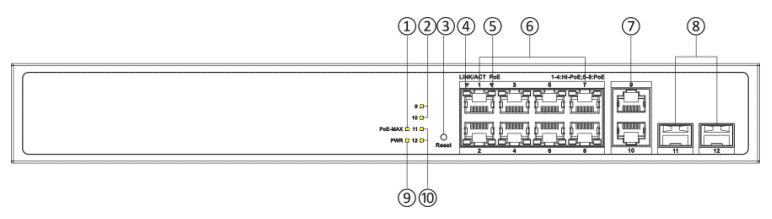
Interface
Front
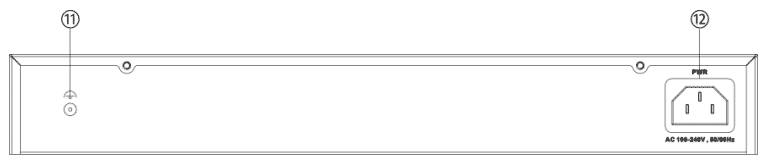
Rear
| No. |
Indicator/ Port |
Description |
|---|---|---|
| 1 |
PoE-MAX Indicator |
|
| 2 |
Gigabit RJ45 Port Indicator |
|
| 3 |
Reset Button |
Press and hold the reset button for
about 5 seconds to restore all the configurations of the switch to
default settings. |
| 4 |
LINK/ACT Indicator |
|
| 5 |
PoE Indicator |
|
| 6 |
Gigabit PoE RJ45 Port |
Used for connection to a PD via a
network cable. Note: Ports 1 to 4 of 1512HP series switches are
Hi-PoE RJ45 ports, which can be connected to high- power
devices. |
| 7 |
Gigabit RJ45 Port |
Used for connection to another device
via a network cable |
| 8 |
Gigabit SFP Fibre Optical
Port |
Used for connection to another device
via an optical fiber when plugged into with an optical
module. |
| 9 |
PWR Indicator |
|
| 10 |
Gigabit SFP Fiber Optical Port
Indicator |
|
| 11 |
Grounding Terminal |
Used for connecting to the grounding
cable to protect the switch from lightning. |
| 12 |
Power Supply |
Use the attached power cord to connect
the switch to a socket. |
Features:
- 8 x 10/100/1000 Mbps PoE Ports, 2 × 10/100/1000 Mbps RJ45, 2 x 10/100/1000 Mbps SFP
- Total PoE Power Budget 130 W
- Support 802.1Q VLAN
- Support 802.3bt Hi-PoE, Max. 90W for one port
- Support STP/RSTP Loop prevention, storm control
- Support cable detection to locate failure
- Support SNMP, QoS, DHCP snooping
- 6 kV Surge Protection
| General | |
| Shell | Metal material |
| Net Weight | 2.7 kg (5.9 lb) |
| Gross Weight | 2.9 kg (6.4 lb) |
| Dimensions (W × H × D) | 335 mm × 44.5 mm × 175.8 mm (13.19'' × 1.75'' × 6.92'') |
| Operating Temperature | 0 °C to 45 °C (0 °F to 113 °F) |
| Storage Temperature | -40 °C to 85 °C (-40 °F to 185 °F) |
| Operating Humidity | 5% to 95% (no condensation) |
| Relative Humidity | 5% to 95% (no condensation) |
| Power Supply | 100-240V~ 50/60Hz 2.5A |
| Installation Mode | Desk-Mounted, Rack (equipped with mounting ears) |
| Max. Power Consumption | 150 W |
| Power Consumption in Idle | 20 W |
| Surge Protection | 6 KV |
| Network Parameters | |
| Ports | 8 × Gigabit PoE port,2 × Gigabit RJ45 port,2 × Gigabit fibre optical port |
| MAC Address Table | 8 K |
| Switching Capacity | Whole-Device Performance: 24 Gbps Port Performance: 24 Gbps |
| Packet Forwarding Rate | Whole-Device Performance: 17.86 Mpps Port Performance: 17.86 Mpps |
| Internal Cache | 4.1 Mbits |
| PoE Power Supply | |
| PoE Standard | Ports 1 to 4: IEEE 802.3af, IEEE 802.3at, IEEE 802.3bt Ports 5 to 8: IEEE 802.3af, IEEE 802.3at |
| PoE Power Pin | Ports 1 to 4: 8-pin power: 1/2(-), 3/6(+), 4/5(+), 7/8(-) Ports 5 to 8: End-span: 1/2(-), 3/6(+) |
| Max. Port Power | Ports 1 to 4: 90 W Ports 5 to 8: 30 W |
| PoE Port | Hi-PoE: Ports 1 to 4 PoE: Ports 5 to 8 |
| PoE Power Budget | 130 W |
| Software Function | |
| Long Range | Ports 1 to 8: up to 300 m. Long range performance may vary depend on camera model or cable condition. |
| Port Isolation | Ports 1 to 12: port isolation mode to improve network
security Ports in an isolation group cannot communicate with each other, but they can communicate with ports outside the isolation group. |
| PoE Watchdog | Ports 1 to 8: auto detect and restart the cameras that do not respond. |
| Link Aggregation | Link aggregation is used to aggregate multiple physical ports
to form a logical port for load balancing, bandwidth expansion, and
port protection. Support static link aggregation. Support 8 aggregation groups. |
| Loop Prevention | Loop prevention is used to prevent the switching network from
forming loops, which will seriously affect network communication.
Disabled by default. Support 802.1D STP. Support 802.1w RSTP. |
| QoS | QoS is used to allocate bandwidth to different services so as
to provide end-to-end service quality assurance. Support port-based priority configuration. Support SP, WRR priority schedule mode. |
| VLAN | VLAN is used for network scale planning and network health
improvement. Support 802.1Q. Configurable VLAN ID from 1-4094. Support Trunk, Access port mode. Support Max. 4094 VLAN. |
| HPP | Support one-click activation and remote management via
Hik-Partner Pro. Functions supported: 1. Display the port rate. 2. Display the port bandwidth utilization rate. 3. Display the PoE power usage. 4. Display topology information. 5. Display the alarm status. 6. Restart ports and devices. 7. Enable port long-rage mode. 8. Remotely upgrade the device. |
| System Maintenance | Support device management via web. Support DHCP Client. Enabled by default for dynamic assignment of management IP addresses. Support Super IP, which is a fixed IP address (10.180.190.200) for direct access. Support management via Hik-Central Pro. Support remote management via Hik-Partner Pro. Support cable detection. Abnormal open circuits and short circuits as well as network cable length can be detected. Supports 802.1ab LLDP for peer device discovery. Support SNMP v1/v2c for third-party management platform access. Support port mirroring for fault locating. |
| Port Rate-Limiting | Port rate-limiting is used for port bandwidth adjustment to prevent network congestion. |
| Storm Control | Storm control is used to prevent switch ports from being
blocked by broadcast or multicast storms in the LAN, which may
affect network communication. Support port rate limiting based on broadcast, multicast, and unknown unicast packets. |
| DHCP Snooping | DHCP Snooping can prevent unauthorized connections to DHCP servers from disrupting the network and affecting normal network communication, and only allow DHCP packets from trusted ports to pass through. Disabled by default. |
| ACL | Port security strategy. Support up to 64 ACL entries. Support up to 128 configuration rules under all ACL entries. |
| IPSG | IPSG can control the security of port access device. Support port, MAC, IP binding. Support 256 security entries. |
| Approval | |
| EMC | CE-EMC (EN 55032: 2015+A11: 2020, EN IEC 61000-3-2: 2019, EN 61000-3-3: 2013+A1: 2019, EN 50130-4: 2011+A1: 2014, EN 55035: 2017+A11: 2020),IC (ICES-003: Issue 7:2020),RCM (AS/NZS CISPR 32: 2015) |
| Safety | CB (AMD1:2009, AMD2:2013, IEC 62368-1: 2014 (Second Edition)), CE-LVD (EN 62368-1: 2014+A11: 2017) |
| Chemistry | CE-RoHS (2011/65/EU),WEEE (2012/19/EU),Reach (Regulation (EC) No.1907/2006) |
| Videos |
|---|
| No videos available |
| Files |
|---|
| Hikvision DS-3E1512HP-SI-8P2T2F Datasheet |
| Hikvision DS-3E1512HP-SI-8P2T2F Quick Start Guide |
| Hikvision DS-3E1512HP-SI-8P2T2F User Manual |
| Links* |
|---|
| Hikvision website |
| Hikvision support site |
* External websites provide additional content that supports the content on connectec.uk however the external Web site is subject to change and is beyond the control of Connectec Ltd. Connectec cannot guarantee the accuracy of content on external websites and does not endorse the information or products on any external websites. You will be subject to the external websites own privacy policy when you follow these links.
Get expert answers to questions specific to this product below or for more help visit our Q&A forum
Be the first to ask a question and help others interested in this product
Read customer reviews or submit your review of this product
Your feedback helps us improve our products and services as well as helping other users make informed buying decisions.
There are no reviews for this product.
Why buy from Connectec?

SUPPORT
Our technical support team are experienced professionals with strong product knowledge and project expertise.

SERVICE
Customer service is our top priority. We’re committed to providing first-class support to every customer.

DELIVERY
We offer FREE mainland UK delivery on orders over £75 and FREE next day delivery on orders over £150*.

PARTNERS
We are approved distributors, offering direct access to full manufacturer warranties and support.
* Qualifying products only, subject to terms. For more information view our delivery information.

